2025.46.5

FSD (Supervised) v13.2.9 다운 언더
S
3
X
Y
CT
FSD (Supervised) v13 다운 언더는 종단간 주행 네트워크의 모든 부분을 업그레이드합니다.포함 사항:- 36Hz, 풀 해상도 AI4 비디오 입력- 네이티브 AI4 입력 및 신경망 아키텍처- 4.2배 데이터 스케일링- 5배 훈련 컴퓨팅 스케일링 (Cortex 클러스터로 가능)- 광자-제어 지연 시간을 2배 단축- 주차 해제, 후진 및 주차 기능 통합- 충돌 회피를 위한 보상 예측 개선- 카메라 청소 개선- 더 부드럽고 정확한 추적을 위한 컨트롤러 재설계- 도로 폐쇄 시 동적으로 우회 경로를 설정하며, 차량이 감지할 경우 영향을 받는 경로를 따라 표시향후 개선 사항:- 3배 모델 크기 스케일링- 3배 모델 컨텍스트 길이 스케일링- 비상 차량 처리를 위한 오디오 입력- 내비게이션을 위한 보상 예측 개선- 오작동 브레이크 및 주차장 저속 주행 개선- 정차, 주차 공간, 진입로 또는 차고 주차를 포함한 목적지 옵션 지원- 지도 및 내비게이션 입력의 효율적인 표현- 카메라 가림 현상 처리 개선편집자 주: 이 FSD 릴리스 노트는 북미 버전과 거의 동일하지만, 북미 버전에는 "시내 도로 및 고속도로의 속도 프로필"이라는 속도 프로필(Speed Profiles) 항목이 생략되어 있습니다.
Full Self-Driving (Supervised) 다운 언더
S
3
X
Y
CT
귀하의 감독 하에 Full Self-Driving (Supervised) 다운 언더는 귀하의 Tesla를 거의 모든 곳에서 운전할 수 있습니다. 차선 변경, 내비게이션 경로를 따르기 위한 분기 선택, 다른 차량 및 물체 주변 주행, 좌회전 및 우회전을 수행합니다. 귀하와 귀하가 승인한 모든 사람은 추가적인 주의를 기울이고 계속해서 집중해야 합니다. 이 기능은 귀하의 차량을 자율 주행 차량으로 만들지 않습니다. 안일해지지 마십시오.귀하의 차량에서 Full Self-Driving (Supervised) 다운 언더 기능이 활성화되었습니다. 이 기능을 사용하려면 오른쪽 스크롤 휠을 한 번 누르십시오. Autopilot 설정에서 Full Self-Driving (Supervised) 다운 언더를 비활성화할 수 있습니다.참고: 이 빌드는 조기 액세스 버전입니다. 귀하와 귀하가 승인한 모든 사람은 추가적인 주의를 기울이고 계속해서 집중해야 합니다.

비전 기반 주의 모니터링
S
3
X
Y
CT
Full Self-Driving (Supervised)이 활성화되면 운전자 모니터링 시스템은 주로 실내 카메라를 사용하여 운전자의 주의력을 판단합니다. 실내 카메라는 명확한 시야를 확보해야 합니다 (예: 카메라가 가려지지 않고, 눈과 팔이 보이며, 충분한 실내 조명이 있고, 운전자가 도로를 정면으로 보고 있어야 합니다). 다른 상황에서는 운전자 모니터링 시스템이 주로 토크 기반(스티어링 휠) 모니터링을 사용하여 운전자 주의력을 감지합니다.실내 카메라가 부주의를 감지하면 경고가 나타납니다. 운전자가 즉시 전방 도로로 주의를 돌리면 경고를 해제할 수 있습니다. 경고는 감지된 부주의의 성격과 빈도에 따라 단계적으로 강화되며, 지속적인 부주의는 스트라이크 아웃(Strikeout)으로 이어집니다.

FSD (Supervised) v14.2.2.2
S
3
X
Y
CT
Full Self-Driving (Supervised) v14.2.2.2에는 다음이 포함됩니다:- 신경망 비전 인코더를 업그레이드하여 고해상도 기능을 활용하여 비상 차량 처리, 도로상의 장애물, 사람의 제스처와 같은 시나리오를 더욱 개선했습니다. (FSD V14.2의 새로운 기능)- FSD가 주차할 장소를 선택할 수 있는 도착 옵션이 추가되었습니다: 주차장, 도로변, 진입로, 주차 건물 또는 길가.- 비상 차량(예: 경찰차, 소방차, 구급차)을 위해 옆으로 비키거나 양보하는 기능이 추가되었습니다.- 막힌 도로 및 우회로를 실시간으로 처리하기 위해 비전 기반 신경망에 내비게이션 및 경로 설정 기능이 추가되었습니다.- 주행 스타일 선호도를 더욱 맞춤 설정할 수 있는 추가 속도 프로필이 추가되었습니다.- 정적 및 동적 게이트 처리가 개선되었습니다.- 도로 잔해물(예: 타이어, 나뭇가지, 상자)에 대한 회피 기능이 개선되었습니다.- 비보호 좌회전, 차선 변경, 차량 끼어들기, 스쿨버스 등 여러 시나리오 처리가 개선되었습니다.- 시스템 오류를 관리하고 성능 저하 시 원활하게 복구하여 신뢰성을 향상시키는 FSD의 기능이 개선되었습니다.- 전면 카메라 시야에 영향을 줄 수 있는 실내 앞유리 잔여물 축적에 대한 알림이 추가되었습니다. 영향이 있다면 서비스 센터를 방문하여 청소하세요!- 빠르고 효율적인 전면 카메라 자동 세척을 제공하고 고속 주행 시 공기역학적 세척을 최적화하기 위해 자동 좁은 시야 세척 기능이 추가되었습니다. (2026년형 이상 Model Y 전용)- 카메라 시야는 주의 모니터링 감도 증가로 이어질 수 있습니다. (FSD v14.2.1의 새로운 기능)향후 개선 사항:- 전반적인 부드러움과 감각.- 주차 공간 선택 및 주차 품질.
도착 옵션
S
3
X
Y
CT
- 이제 로보택시 스타일 하차를 위해 주차장, 도로, 진입로, 주차 건물, 길가와 같은 도착 옵션을 선택할 수 있습니다.- 도착 옵션 및 선호 주차 위치에 대한 귀하의 선호 사항은 각 목적지에 대해 유지됩니다.- 당사의 추론 모델은 귀하의 목적지에 적합한 옵션을 평가하고 직관적인 기본값을 선택할 것입니다.- 내비게이션 핀은 선택된 도착 옵션에 따라 조정됩니다. (FSD v14.2.2 릴리스 노트에 추가됨)
페인트 샵 (Paint Shop) 업그레이드
S
3
X
Y
CT
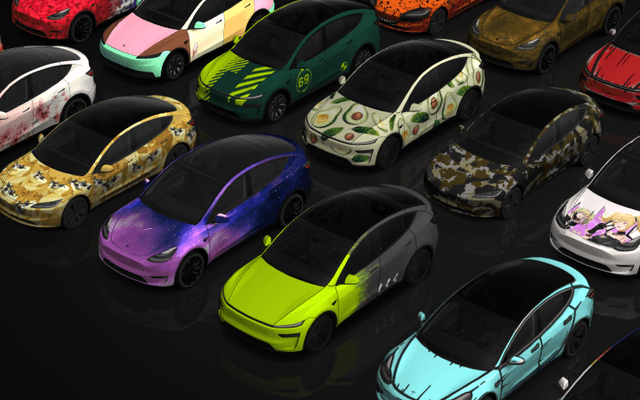
페인트 샵(Paint Shop)은 이제 새로운 랩, 창문 틴팅 옵션 및 번호판 디자인으로 Cybertruck을 맞춤 설정할 수 있도록 합니다. 도로를 달리기 전에 완벽한 모습을 연출하세요!앱 런처(App Launcher) > 토이박스(Toybox) > 페인트 샵(Paint Shop)으로 이동하십시오.
FSD (Supervised) v14.2.2.1
3
Y
CT
Full Self-Driving (Supervised) v14.2.2.1에는 다음이 포함됩니다:- 신경망 비전 인코더를 업그레이드하여 고해상도 기능을 활용하여 비상 차량 처리, 도로상의 장애물, 사람의 제스처와 같은 시나리오를 더욱 개선했습니다. (FSD V14.2의 새로운 기능)- FSD가 주차할 장소를 선택할 수 있는 도착 옵션이 추가되었습니다: 주차장, 도로변, 진입로, 주차 건물 또는 길가.- 비상 차량(예: 경찰차, 소방차, 구급차)을 위해 옆으로 비키거나 양보하는 기능이 추가되었습니다.- 막힌 도로 및 우회로를 실시간으로 처리하기 위해 비전 기반 신경망에 내비게이션 및 경로 설정 기능이 추가되었습니다.- 주행 스타일 선호도를 더욱 맞춤 설정할 수 있는 추가 속도 프로필이 추가되었습니다.- 정적 및 동적 게이트 처리가 개선되었습니다.- 도로 잔해물(예: 타이어, 나뭇가지, 상자)에 대한 회피 기능이 개선되었습니다.- 비보호 좌회전, 차선 변경, 차량 끼어들기, 스쿨버스 등 여러 시나리오 처리가 개선되었습니다.- 시스템 오류를 관리하고 성능 저하 시 원활하게 복구하여 신뢰성을 향상시키는 FSD의 기능이 개선되었습니다.- 전면 카메라 시야에 영향을 줄 수 있는 실내 앞유리 잔여물 축적에 대한 알림이 추가되었습니다. 영향이 있다면 서비스 센터를 방문하여 청소하세요!- 빠르고 효율적인 전면 카메라 자동 세척을 제공하고 고속 주행 시 공기역학적 세척을 최적화하기 위해 자동 좁은 시야 세척 기능이 추가되었습니다. (2026년형 이상 Model Y 전용)- 카메라 시야는 주의 모니터링 감도 증가로 이어질 수 있습니다. (FSD v14.2.1의 새로운 기능)향후 개선 사항:- 전반적인 부드러움과 감각.- 주차 공간 선택 및 주차 품질.

FSD (Supervised) v14.2.2
S
3
X
Y
CT
Full Self-Driving (Supervised) v14.2.2에는 다음이 포함됩니다:- 신경망 비전 인코더를 업그레이드하여 고해상도 기능을 활용하여 비상 차량 처리, 도로상의 장애물, 사람의 제스처와 같은 시나리오를 더욱 개선했습니다. (FSD V14.2의 새로운 기능)- FSD가 주차할 장소를 선택할 수 있는 도착 옵션이 추가되었습니다: 주차장, 도로변, 진입로, 주차 건물 또는 길가.- 비상 차량(예: 경찰차, 소방차, 구급차)을 위해 옆으로 비키거나 양보하는 기능이 추가되었습니다.- 막힌 도로 및 우회로를 실시간으로 처리하기 위해 비전 기반 신경망에 내비게이션 및 경로 설정 기능이 추가되었습니다.- 주행 스타일 선호도를 더욱 맞춤 설정할 수 있는 추가 속도 프로필이 추가되었습니다.- 정적 및 동적 게이트 처리가 개선되었습니다.- 도로 잔해물(예: 타이어, 나뭇가지, 상자)에 대한 회피 기능이 개선되었습니다.- 비보호 좌회전, 차선 변경, 차량 끼어들기, 스쿨버스 등 여러 시나리오 처리가 개선되었습니다.- 시스템 오류를 관리하고 성능 저하 시 원활하게 복구하여 신뢰성을 향상시키는 FSD의 기능이 개선되었습니다.- 전면 카메라 시야에 영향을 줄 수 있는 실내 앞유리 잔여물 축적에 대한 알림이 추가되었습니다. 영향이 있다면 서비스 센터를 방문하여 청소하세요!- 빠르고 효율적인 전면 카메라 자동 세척을 제공하고 고속 주행 시 공기역학적 세척을 최적화하기 위해 자동 좁은 시야 세척 기능이 추가되었습니다. (2026년형 이상 Model Y 전용)- 카메라 시야는 주의 모니터링 감도 증가로 이어질 수 있습니다. (FSD v14.2.1의 새로운 기능)향후 개선 사항:- 전반적인 부드러움과 감각.- 주차 공간 선택 및 주차 품질.

Automatic HOV Lanes Routing
S
3
X
Y
CT
Navigation now includes an option to use high-occupancy vehicle (HOV) carpool lanes automatically based on time, passenger count, and road restrictions.
Go to Controls > Navigation > Use HOV.

Supercharger Site Maps
S
3
X
Y
CT
You can now see a 3D view of select Tesla Superchargers by tapping "View Site Map". When navigating to a pilot location, the site layout and live occupancy (Available / Occupied / Down) will be displayed upon arrival.

Phone Left On Wireless Charger
S
3
X
Y
Your vehicle will chime a few seconds after the doors close if a phone is left on the wireless charger and no occupants are detected.
Go to Controls > Locks > Phone Left On Wireless Charger Chime.
Phone Left Behind
3
Y
CT
Your vehicle will chime a few seconds after the doors close if a phone key is inside the cabin or a phone is left on the wireless charger and no occupants are detected. Phone key detection requires UWB-supported devices.
Go to Controls > Locks > Phone Left Behind Chime.

Save Charge Limit by Location
S
3
X
Y
CT
You can now save a charge limit for your current location while parked, and it will be applied automatically next time you charge there.
Go to Controls > Charging.

SpaceX Docking Simulator
S
3
X
Y
CT
Become an astronaut and prove your skills by docking with the International Space Station. Control and guide the rocket in this 3D docking simulator game using a set of controls based on actual interfaces used by NASA astronauts.
To play, shift into Park (P), and go to App Launcher > Arcade > SpaceX.
FSD (Supervised) v13.2.9 Down Under
3
Y
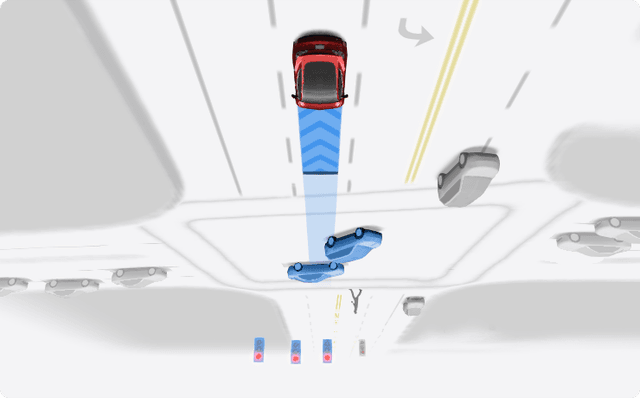
FSD (Supervised) v13 Down Under upgrades every part of the end-to-end driving network.
Includes:
- 36 Hz, full-resolution AI4 video inputs
- Native AI4 inputs and neural network architectures
- 4.2x data scaling
- 5x training compute scaling (enabled by the Cortex cluster)
- Reduced photon-to-control latency by 2x
- Integrated unpark, reverse, and park capabilities
- Improved reward predictions for collision avoidance
- Improved camera cleaning
- Redesigned controller for smoother, more accurate tracking
- Dynamic routing around road closures, which displays them along an affected route when they are detected by the fleet
Upcoming Improvements:
- 3x model size scaling
- 3x model context length scaling
- Audio inputs for better handling of emergency vehicles
- Improved reward predictions for navigation
- Improvements to false braking and slower driving in parking lots
- Support for destination options including pulling over, parking in a spot, driveway, or garage
- Efficient representation of maps and navigation inputs
- Improved handling of camera occlusions
Editorial note: These FSD release notes are almost identifical to the version available in North America, however, it omits the Speed Profiles bullet point, which in North America reads: "Speed Profiles on both City Streets and Highways"
Full Self-Driving (Supervised) Down Under
3
Y
Under your supervision, Full Self-Driving (Supervised) Down Under can drive your Tesla almost anywhere. It will make lane changes, select forks to follow your navigation route, navigate around other vehicles and objects, and make left and right turns. You and anyone you authorize must use additional caution and remain attentive. It does not make your vehicle autonomous. Do not become complacent.
Full Self-Driving (Supervised) Down Under is enabled on your vehicle. To use the feature, press the right scroll wheel once. You can disable Full Self-Driving (Supervised) Down Under in Autopilot Settings.
Note: This is an early access build. You and anyone you authorize must use additional caution and remain attentive.

Vision-Based Attention Monitoring
3
Y
When Full Self-Driving (Supervised) is enabled, the driver monitoring system primarily relies on the cabin camera to determine driver attentiveness. Cabin camera must have clear visibility (e.g., camera is not occluded, eyes, arms, are visible, there is sufficient cabin illumination, and the driver is looking forward at the road). In other circumstances, the driver monitoring system will primarily rely on torque-based (steering wheel) monitoring to detect driver attentiveness.
If the cabin camera detects inattentiveness, a warning will appear. The warning can be dismissed by the driver immediately reverting their attention back to the road ahead. Warnings will escalate depending on the nature and frequency of detected inattentiveness, with continuous inattention leading to a Strikeout.
Minor Updates
S
3
X
Y
CT
- Enable or disable wireless phone charging pads in Controls > Charging.
- Your vehicle will now send a mobile alert if any cabin door is left open while Dog Mode is active.
- Add Spotify tracks to your queue right from the search screen.
- Scroll through large Spotify playlists, albums, podcasts, audiobooks, and your library seamlessly, without paging. (AMD Ryzen required)
- Lock Sound now includes Light Cycle from Tron Mode. Go to App Launcher > Toybox > Boombox > Lock Sound.
- Allow your vehicle to share charging data with Tesla to support features like Charge Stats in the Tesla app. (Added in update 2025.44.25.3)

New Wheel Options
S
3
X
Y
CT
The new wheel designs that are available on the Standard Model 3 and Model Y are now available for all vehicles to equip in the vehicle visualization.
The new 18” Prismata for the Model 3 and the 18” Aperture wheels are available for all models in the tire section. To view or select the new wheels, go to Controls > Service and select tires and wheels.

Express Lanes
S
3
X
Y
CT
Tesla has added support for Express Lanes in some vehicles. Similar to HOV or toll roads, Express Lanes are faster lanes that may charge fees based on vehicle occupancy, vehicle type, and time of day.
With this update, Tesla is adding the ability for users to toggle the use of Express Lanes on or off in navigation settings. This feature is not available in all vehicles and Tesla may still be testing it.

Supercharger Live Maps Shows Exact Models
S
3
X
Y
CT
The new Supercharger Site Maps not only provide a real-time 3D rendering of a Supercharger site but also show the actual vehicle models being charged at each stall.
Tesla will show what kind of vehicle is charging at each stall, whether it’s the original Model Y, the new Model Y, a Cybertruck, or show whether it’s a non-Tesla being charged.
The Supercharger maps are useful to see which stalls are open, their location, which are handicap accessible or whether a location has pull-through stalls.

Dashcam Viewer Zoom Support
S
3
X
Y
CT
When you’re viewing a video in the Dashcam Viewer, you can now pinch the video to zoom in. In addition, you can also pan the video while zoomed to see other parts of the video.
Note: This feature is limited to vehicles with Tesla’s AMD Ryzen infotainment processor.

Camera Visibility Warning Improvement
S
3
X
Y
CT
When you receive a camera visibility warning, indicating that a camera has an obscured view, the camera's view will now be labeled. This lets you know exactly which camera needs to be cleaned.
The display is similar to the Dashcam Viewer, where the camera location is overlaid on top of a photo from the camera. Previously, the camera was unlabeled, making it unclear which camera was obscured and needed to be cleaned.
Tesla will display Front for one of the front cameras underneath the windshield and fascia for the front bumper camera.

V4 Supercharger Visualization
S
3
X
Y
CT
Tesla recently launched charging visualizations on the vehicle’s display. Tesla supports a wide variety of chargers and includes a different visualization for each type, including the mobile connector, Wall Connector, v2, and v3 Supercharger styles, as well as a generic type for third-party chargers.
However, surprisingly absent was a unique visualization for the newer style, V4 Superchargers. With this update, Tesla has added a proper visualization for the V4 Superchargers.

Wrap & License Plate Icons
S
3
X
Y
CT
You can easily access the vehicle wraps and license plate options by navigating to Controls > Software. Underneath the vehicle visualization, you’ll have a photo of the selected license plate for your vehicle, as well as a wrapping paper icon that will take you directly to the vehicle visualization options.
The wrapping paper icon replaces the old colored square that used to take you to the vehicle Colorizer feature.

Car Wash Mode Notification
S
3
X
Y
CT
Tesla will now show you a notification reminding you to use Car Wash Mode. Whenever you’re near a car wash, Tesla pops up a reminder that lets you easily enable Car Wash Mode.
This is part of Tesla’s Car Wash Mode improvements in this update.

Parking Brake
S
3
X
Y
CT
Tesla has removed the ability to enable the emergency brake (parking brake) from the vehicle’s display. Near the bottom of the Controls > Safety menu, users could manually enable the vehicle’s emergency brake. However, this option has now disappeared.
However, users can still enable the vehicle’s emergency brake by using the gear stalk or Park icon on the touch screen.

Car Wash Mode Redesign
S
3
X
Y
CT
Tesla has redesigned the Car Wash Mode feature with this update. It now includes a visualization of the vehicle on the right with the usual checklist items on the left.
For anyone not familiar with Car Wash Mode, it features a real-time checklist to help prepare your vehicle for a car wash. If any items are in the proper setting, such as a window or trunk being opened, the dot next to the item will turn red.
The ‘Enable Free Roll’ option at the bottom is now more obvious, making it easier for users to find how to put their vehicle into neutral.

Switch to Bluetooth
S
3
X
Y
CT
If your phone is connected via Bluetooth and the vehicle detects that your phone is playing audio, it will now prompt you to switch over to the Bluetooth audio source, so the audio comes out of your vehicle’s speakers instead.
Most users likely listen to a music streaming service such as Apple Music or Spotify, but when they listen to audio on their phone, there is often a second pause, leaving the driver wondering why the audio isn’t coming out of their vehicle’s speakers.
This solves that problem and also makes it easier to switch to Bluetooth instead of manually finding and tapping the Bluetooth app.

New Visualizations With Unreal Engine
S
X
The new visualizations that have been available on the 2026 Model S and Model X are now available on all 2021+ Model S and Model X vehicles.
Besides the improved visuals in the instrument cluster and in the menus, you can now freely rotate your vehicle’s visualization in the Controls menu, letting you view your vehicle from any angle.
In addition, the module that pops up when parked, which lets you open the doors and trunk, is also interactive, allowing you to pan and zoom in on the vehicle.

Air Suspension Controls
S
X
Air suspension controls for the Model S and Model X are now available in the main Controls section, rather than requiring users to go to the separate Suspension tab.
The 2026 models already include this feature. 2025 and older vehicles keep the older, more detailed Suspension menu, instead of the simplified version found in the 2026 models.

Boomerang Fu Game Removed
S
3
X
Y
CT
The game Boomerang Fu has been removed from vehicles and replaced with SpaceX Docking Simulator. The game's license likely expired this year, as it was released in last year’s holiday update.

Favorites On Map
S
3
X
Y
CT
Tesla has made several changes to favorites and home/work in this update. However, this change has gone undocumented in the release notes.
In addition to putting the home/work icons into the Navigate box and showing your top two suggestions underneath, Tesla is also pinning all of your favorites, home, and work locations directly on the map.
This makes it much easier to orient yourself as you move the map around and makes it obvious when you’re near one of your favorites, such as a friend’s home, restaurant, or other favorite location.

View Dashcam Storage
S
3
X
Y
CT
You can now view the storage space of your Dashcam USB drive. You can view the amount of space used by Dashcam and the total size of the drive.
To view Dashcam storage, go to Controls > Safety and scroll down to Dashcam.

Dashcam Filters
S
3
X
Y
CT
Tesla has made additional improvements to the Dashcam Viewer. In addition to having Dashcam and Sentry tabs in the Dashcam Viewer, Tesla now includes additional categories for Dashcam videos.
The system will automatically categorize videos taken with Dashcam and Sentry Mode and put them into appropriate categories that triggered the footage, such as Honk, Manual Save, Handle Pull, etc.

Hebrew Language Added
S
X
CT
You can now choose Hebrew as your touchscreen language.
To change the language, shift into Park, and go to Controls > Display > Touchscreen Language.

Service Mode Improvements
S
3
X
Y
CT
The Thermal Control Components panel has been added to Service Mode to support thermal Noise, Vibration, and Harshness (NVH) diagnosis. It adds the ability to individually control thermal components, set specific targets, and sweep across operating ranges with real-time feedback. It also includes a 3D static view of the heat pump, including the radiator, blower motor, louver, and pumps.
Models: Model S (2021+), Model 3 (Heat Pump), Model X (2021+), Model Y, Cybertruck
In the Airbags panel, a routine has been added that allows users to disarm the airbags. With this routine, users no longer need to disconnect the Low Voltage (LV) battery when diagnosing the Safety and Restraints system. Once the airbags are disarmed, individual components, such as an airbag or pretensioner, can be tapped to view the resistance readings.
Models: Model S (2021+), Model 3, Model X (2021+), Model Y, Cybertruck